Factory Droid with Any OpenAI-Compatible Endpoint
Factory droid supports custom models through BYOK (Bring Your Own Key), but environment variables don’t work for the interactive CLI or desktop app. The droid daemon has its own API client and ignores ANTHROPIC_BASE_URL and ANTHROPIC_MODEL env vars. The working path is adding your model to the customModels array in ~/.factory/settings.json and pointing it at a local LiteLLM proxy.
Here’s the full setup for routing Factory droid through LiteLLM to any OpenAI-compatible endpoint.
the architecture
The proxy sits between Factory droid and your model provider:
Factory droid  -->  LiteLLM (localhost:4000)  -->  OpenAI-compatible endpoint
customModels       translates format              actual model inference
baseUrl + apiKey
LiteLLM accepts OpenAI-compatible requests on port 4000 and forwards them to whatever provider you configure. The droid thinks it’s talking to a standard OpenAI-style endpoint. LiteLLM handles format conversion, parameter stripping, and response normalization.
step 1: set up the LiteLLM proxy
Install LiteLLM in an isolated virtual environment:
python3.12 -m venv ~/.config/litellm/venv
~/.config/litellm/venv/bin/pip install 'litellm[proxy]'
Create the config file at ~/.config/litellm/config.yaml. This maps local model names to provider endpoints:
general_settings:
  master_key: sk-litellm-local-your-master-key
litellm_settings:
  drop_params: true
model_list:
- litellm_params:
    api_base: https://your-provider-endpoint/v1
    api_key: your-provider-api-key
    model: openai/qwen3p6-plus
    stream: true
  model_name: qwen3p6-plus
- litellm_params:
    api_base: https://your-provider-endpoint/v1
    api_key: your-provider-api-key
    model: openai/gemini-3.1-pro
  model_name: gemini-3.1-pro
- litellm_params:
    api_base: https://your-provider-endpoint/v1
    api_key: your-provider-api-key
    model: openai/deepseek-v3p2
    stream: true
  model_name: deepseek-v3p2
The drop_params: true setting strips Anthropic-specific parameters like thinking and top_k that confuse OpenAI-compatible endpoints. The stream: true is required for models that reject large non-streaming requests with a 400 error about max_tokens.
The openai/ prefix tells LiteLLM to use OpenAI Chat Completions format when forwarding. The model_name is what you’ll reference in Factory’s settings.
Start the proxy:
nohup ~/.config/litellm/venv/bin/litellm --config ~/.config/litellm/config.yaml --port 4000 > /tmp/litellm.log 2>&1 &Verify it’s running:
curl -s -H "Authorization: Bearer sk-litellm-local-your-master-key" \
  -H "Content-Type: application/json" \
  http://localhost:4000/v1/chat/completions | head -5
step 2: configure Factory droid custom models
Factory droid reads custom models from ~/.factory/settings.json, not from environment variables. Add the customModels array to your existing settings:
{
  "enabledPlugins": {
    "core@factory-plugins": true
  },
  "customModels": [
    {
      "model": "qwen3p6-plus",
      "displayName": "Qwen 3 Plus (Local LiteLLM)",
      "baseUrl": "http://localhost:4000",
      "apiKey": "sk-litellm-local-your-master-key",
      "provider": "generic-chat-completion-api",
      "maxOutputTokens": 16384
    }
  ]
}
The provider field must be exactly anthropic, openai, or generic-chat-completion-api. Since LiteLLM exposes an OpenAI-compatible interface, use generic-chat-completion-api. The baseUrl points at the local proxy, the apiKey is the LiteLLM master key, and maxOutputTokens caps the response below gateway limits.
Factory’s file watcher detects changes to settings.json automatically. No restart needed. If you have ~/.factory/config.json, remove it. The droid reads custom models from settings.json, not config.json.
step 3: select the custom model
Start Factory droid in your project directory:
cd /path/to/your/project
droid
Type /model at the prompt. Your custom model appears in a separate “Custom models” section below the Factory-provided models:
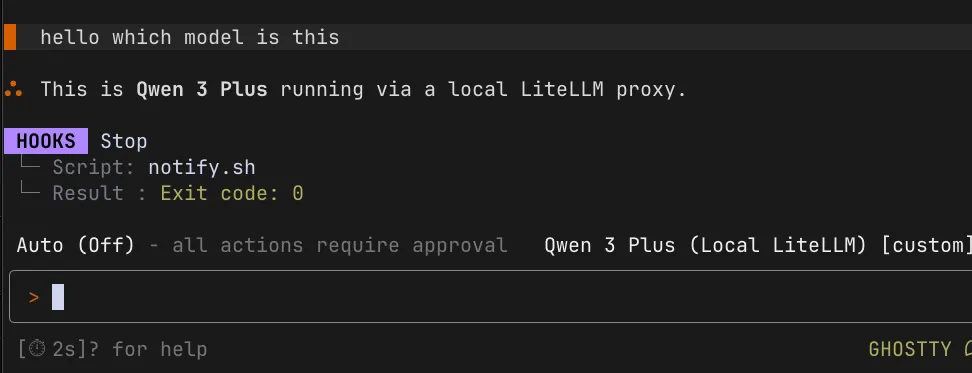
Select it and start a session. The droid routes through the LiteLLM proxy to your provider endpoint. LiteLLM handles the format translation and forwards the request.
You can verify the proxy is receiving requests by checking the health endpoint:
curl http://localhost:4000/healthThe health response shows “Models tracked” with at least 1, confirming requests are passing through LiteLLM.
step 4: keep Claude Code working with the same proxy
The same LiteLLM proxy works for both Factory droid and Claude Code. For Claude Code, use environment variables and shell functions:
_claude_via_litellm() {
  local model_id="$1"
  shift
  env -u ANTHROPIC_API_KEY \
  ANTHROPIC_BASE_URL=http://localhost:4000 \
  ANTHROPIC_AUTH_TOKEN=sk-litellm-local-your-master-key \
  ANTHROPIC_MODEL="$model_id" \
  ANTHROPIC_DEFAULT_HAIKU_MODEL="$model_id" \
  CLAUDE_CODE_SUBAGENT_MODEL="$model_id" \
  claude "$@"
}

alias claude-qwen='_claude_via_litellm qwen3p6-plus'
alias claude-gemini='_claude_via_litellm gemini-3.1-pro'
alias claude-deepseek='_claude_via_litellm deepseek-v3p2'
Claude Code reads environment variables directly from the shell because it runs as a foreground process. Factory droid spawns its own daemon, so env vars don’t work for it. The proxy config in settings.json is the equivalent path for droid.
why environment variables don’t work for Factory droid
Environment variables work for Claude Code, Cursor, and most CLI tools. They don’t work for Factory droid’s interactive mode. The droid daemon spawns as a separate process with its own API client, hardcoded to apiProvider: "vertex_anthropic" in the session configuration. It doesn’t inherit shell environment variables and doesn’t read ANTHROPIC_BASE_URL or ANTHROPIC_MODEL.
The shell function approach with env overrides works for one-shot droid exec commands, but interactive sessions bypass those overrides entirely. The LiteLLM health endpoint confirms this. Running curl http://localhost:4000/health while droid is active with env var aliases shows “Models tracked: 0” — zero requests pass through the proxy.
The customModels array in settings.json is the mechanism that actually works for interactive mode. It configures the droid’s own API client to point at your endpoint instead of Factory’s default provider.
the desktop app
The Factory desktop app doesn’t support custom models at all. It has its own credential flow through auth.v2.file and a WebSocket handshake with Factory’s servers. Environment variables set in .zshrc aren’t inherited by macOS GUI apps, and even launchctl setenv doesn’t change the hardcoded provider routing in the Electron daemon.
If you had a previous trial account and sessions won’t resume, check the session settings file at ~/.factory/sessions/*/session-id.settings.json. Stale providerLock and archivedAt fields prevent session resume. Remove those fields and Factory recreates them under the current account on next launch.
troubleshooting
Model doesn’t appear in /model selector: Check JSON syntax in settings.json. Verify all required fields are present: model, displayName, baseUrl, apiKey, provider, maxOutputTokens. The file watcher picks up changes automatically, but restarting droid helps if it seems stuck.
“Invalid provider” error: The provider must be exactly anthropic, openai, or generic-chat-completion-api. Check for typos and casing.
400 error on max_tokens: LiteLLM’s drop_params: true strips Anthropic-specific fields. Make sure it’s set in your config.yaml. If you’re still getting max_tokens errors, add a pre-call hook to cap the token count.
Proxy responds but droid shows errors: Check the health endpoint to confirm requests are arriving at LiteLLM. If the health shows 0 tracked models, the droid isn’t routing through the proxy at all. Verify baseUrl in settings.json matches the LiteLLM port (http://localhost:4000).
Health endpoint shows 0 requests: The droid is bypassing LiteLLM. This means the customModels config isn’t being read. Check settings.json syntax and verify the file is at ~/.factory/settings.json, not ~/.factory/config.json. Remove config.json if it exists.