Solving the Context Problem - A Local RAG System for Code
Solving the Context Problem: A Local RAG System for Code
Yesterday I was using Kilocode to help refactor some authentication code in a 7,620-file Java codebase. The AI agent kept giving me generic advice because it couldn’t see the actual implementation patterns in the project or some constraints. I could paste in a few files, but then I’d hit the context limit. Paste in more, and earlier files would fall out of context. The fundamental problem: you can’t fit an entire codebase into an LLM’s context window.
This is why I built 42Context Engine—a privacy-first RAG (Retrieval Augmented Generation) system for code that runs entirely on your machine. Instead of trying to cram thousands of files into context, it converts your codebase into semantic vectors and lets the LLM query exactly what it needs through the Model Context Protocol.
The result? Any AI agent (Roocode, Claude, Cursor, VS Code Copilot) can now “see” all 7,620 files through semantic search, with 11ms query latency and zero data leaving my machine.
The Context Window Problem
Claude Sonnet 4.5 and many other models out there has in average 200,000 token context window. That sounds like a lot until you do the math. A typical source file averages 200-400 tokens. Even with an optimistic estimate, you can fit maybe 500-1,000 files in context at once.
But codebases are bigger than that:
- Keycloak: 10,000+ files
- I ran cloc on the Keycloak codebase to see what we’re dealing with:
Language                       files          blank        comment           code
---------------------------------------------------------------------------------
Java                            7027         159928         175216         642435
TypeScript                       932           8767           1131          93928
JSON                             153            373              0          85567
Properties                       279           2484           2278          79457
AsciiDoc                         571          13059            164          34671
YAML                              93           2475            386          19430
Maven                            159           1179           2195          17072
XML                              291           1111           3295          14639
XSD                               65            897            419          12449
Text                              54            734              0           7864
...........
---------------------------------------------------------------------------------
SUM:                           10064         195085         185962        1026358
---------------------------------------------------------------------------------- Linux Kernel: 80,000+ files etc Even medium-sized projects blow past context limits. And it gets worse: AI coding agents perform better with less noise in context. Dumping 1,000 files you don’t need dilutes the signal.
The traditional solution is to manually curate what goes into context—you paste in 3-4 relevant files and hope you picked the right ones. But how do you know which files are relevant until the AI agent has analyzed them?
This is a classic retrieval problem. We need a system that:
- Understands the semantic meaning of code, not just keywords
- Retrieves only what’s relevant for each query
- Works with any AI agent through a standard protocol (MCP)
- Keeps everything local for privacy and speed
Building a Local Code RAG System
The architecture I landed on has four layers working together:
Layer 1: Real-Time Indexing
A file watcher monitors your codebase using chokidar. When files change, they get parsed immediately using Tree-sitter, proper AST-based parsing that understands code structure.
[EmbeddingOptimizer] Refreshing model to prevent memory buildup...
[EmbeddingOptimizer] Loading model with optimization...
[EmbeddingOptimizer] Model loaded in 267ms
[EmbeddingOptimizer] Model refresh complete
class FileWatcher {
async watchProject(projectPath: string) {
const watcher = chokidar.watch(projectPath, {
ignored: /(^|[\/\\])\../, // ignore dotfiles
persistent: true,
ignoreInitial: false,
awaitWriteFinish: {
stabilityThreshold: 2000, // wait 2s after write
pollInterval: 100
}
});
watcher.on('change', async (filePath) => {
await this.reindexFile(filePath);
});
}
}Layer 2: Semantic Chunking
Tree-sitter extracts semantic units—functions, classes, methods, interfaces. Each becomes a “chunk” with full context:
42context index .../src/main/java/de.../controller -r

[EmbeddingService] Embedding optimizer initialized for advanced memory management
Initializing Semantic Search...
[EmbeddingService] Initializing embedding service with model: Xenova/all-MiniLM-L6-v2
[EmbeddingOptimizer] Initializing with memory optimization...
[EmbeddingOptimizer] Initial memory: 17.0MB used
[EmbeddingOptimizer] Loading model with optimization...
Java language module loaded successfully
Initialized Tree-sitter parser for typescript
Initialized Tree-sitter parser for javascript
Initialized Tree-sitter parser for python
Initialized Tree-sitter parser for go
Initialized Tree-sitter parser for rust
Initialized Tree-sitter parser for cpp
Initialized Tree-sitter parser for java
[EmbeddingOptimizer] Model loaded in 86418ms
[EmbeddingOptimizer] Initialization complete
[EmbeddingService] Embedding optimizer ready
Embedding service initialized
ChromaDB collection 'code_vectors' initialized successfully
Vector store initialized
Semantic Search initialized successfully
Indexing directory: .../src/main/java/..../controller (recursive: true)
Found 9 total files, 9 supported files
Processing batch 1/1 (9 files)
Indexing file: ......../controller/cof/ConfirmationOfFundsController.java
Parsed ......../controller/cof/ConfirmationOfFundsController.java in 38ms, found 73 chunks
Extracted 73 chunks from ......../controller/cof/ConfirmationOfFundsController.java
[EmbeddingService] Using EmbeddingOptimizer for batch processing of 73 chunks
[EmbeddingOptimizer] Processing 73 chunks with memory optimization
[EmbeddingOptimizer] Processing optimized batch 1/73
[EmbeddingOptimizer] Processing optimized batch 2/73
[EmbeddingOptimizer] Processing optimized batch 3/73
[EmbeddingOptimizer] Processing optimized batch 4/73
[EmbeddingOptimizer] Processing optimized batch 5/73
[EmbeddingOptimizer] Processing optimized batch 6/73
[EmbeddingOptimizer] Processing optimized batch 7/73
[EmbeddingOptimizer] Processing optimized batch 8/73
[EmbeddingOptimizer] Processing optimized batch 9/73
# ...... (71 more batches)
[EmbeddingOptimizer] Completed processing 9/9 chunks
Generated 9 embeddings
Deleted vectors for file: ......controller/util/RequestUriHandler.java
Added 9 vectors to ChromaDB collection
Indexed 9 vectors for ......controller/util/RequestUriHandler.java
✓ 9/9: ......controller/util/RequestUriHandler.java
Indexing completed: 9/9 files processed
Indexing completed successfully
ChromaDB connection closed
async extractSemanticChunks(node: Parser.SyntaxNode, sourceCode: string) {
const chunks: CodeChunk[] = [];
// Extract meaningful code units, not arbitrary line ranges
const extractableTypes = new Set([
'function_declaration',
'class_declaration',
'method_definition',
'interface_declaration'
]);
for (const node of walkAST(node)) {
if (extractableTypes.has(node.type)) {
chunks.push({
content: sourceCode.substring(node.startIndex, node.endIndex),
filePath: this.currentFile,
startLine: node.startPosition.row + 1,
endLine: node.endPosition.row + 1,
type: this.getChunkType(node.type),
signature: this.extractSignature(node),
documentation: this.extractDocs(node),
dependencies: this.extractDependencies(node)
});
}
}
return chunks;
}The key insight: chunk by semantic meaning, not arbitrary size. A 200-line function is one chunk. Three related methods might be separate chunks even if they’re adjacent.
Layer 3: Vector Embeddings
Each chunk gets converted to a 384-dimensional vector using Xenova’s all-MiniLM-L6-v2 model, > I later modified the API to accept any transformer.js model in terms of performance by just replacing the model with an env. This runs locally via Transformers.js—no API calls, no cloud services:
 42context index-status

[2025-11-01T13:04:26.715Z] [INFO] Starting 42Context Engine CLI v3.0.4...
Indexing Status Report:
======================
Java language module loaded successfully
ChromaDB collection 'code_vectors' initialized successfully
Found 4 indexed directories:

Directory               Vectors        Last Indexed
-------------------------------------------------------------------
.../..../controller/cof   73        11/1/2025, 1:51:02 PM
......./controller/...   333       11/1/2025, 1:52:37 PM
.../..../controller/tb    24        11/1/2025, 1:52:38 PM
......./controller/util   9         11/1/2025, 1:52:44 PM
ChromaDB connection closed
async generateBatchEmbeddings(chunks: CodeChunk[]) {
const batchSize = 32;
const results: CodeVector[] = [];
for (let i = 0; i < chunks.length; i += batchSize) {
const batch = chunks.slice(i, i + batchSize);
// Check memory before processing
await this.memoryManager.checkMemoryPressure();
// Generate embeddings locally
const embeddings = await this.model.encode(
batch.map(chunk => this.prepareTextForEmbedding(chunk)),
{ pooling: 'mean', normalize: true }
);
// Convert to storable vectors
for (let j = 0; j < batch.length; j++) {
results.push({
...batch[j],
vector: Array.from(embeddings.data.slice(j * 384, (j + 1) * 384))
});
}
// Critical: explicit cleanup prevents memory leaks
await this.cleanup();
}
return results;
}The embedding model captures semantic similarity. Code that does similar things ends up with similar vectors, even if variable names and syntax differ completely.
Layer 4: MCP Integration This is where it gets interesting. The Model Context Protocol lets any MCP-compatible AI agent (Roocode, Claude Desktop, Cursor, VS Code Copilot, Cline) call these tools:
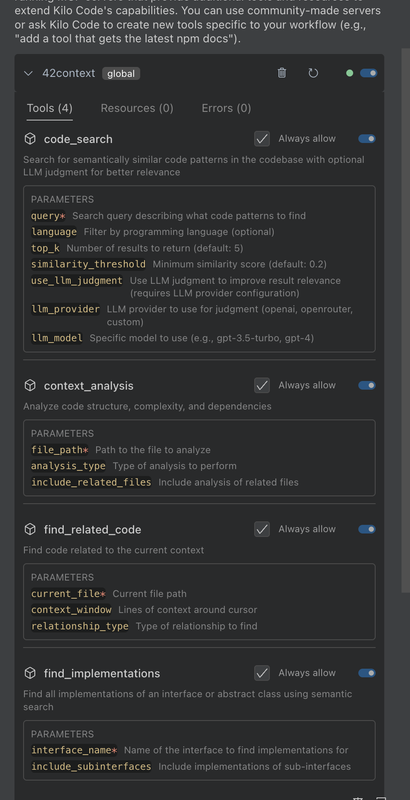
// Register code_search tool with MCP
server.registerTool({
  name: 'code_search',
  description: 'Search for semantically similar code patterns',
  inputSchema: {
    type: 'object',
    properties: {
      query: { type: 'string' },
      language: { type: 'string', enum: ['javascript', 'typescript', 'python', 'java'] },
      top_k: { type: 'number', default: 5 },
      similarity_threshold: { type: 'number', default: 0.2 }
    },
    required: ['query']
  },
  handler: async (args) => {
    const search = new SemanticSearch(config);
    await search.initialize();

    const results = await search.search(args.query, {
      topK: args.top_k,
      language: args.language,
      minSimilarity: args.similarity_threshold
    });

    await search.close();
    return results;
  }
});
Now when your AI agent needs to understand your codebase, it doesn’t ask you to paste files. It calls code_search with a query like “authentication flow implementation” and gets back the 5 most relevant code chunks with their context.
How It Actually Works in Practice
Here’s a real example. I wanted the model to get the context specifically as I wanted to implement a new feature in the 42context project and I use Kilocode for testing and ask: “to understand the core functionality and entry point for the 42context codebase”
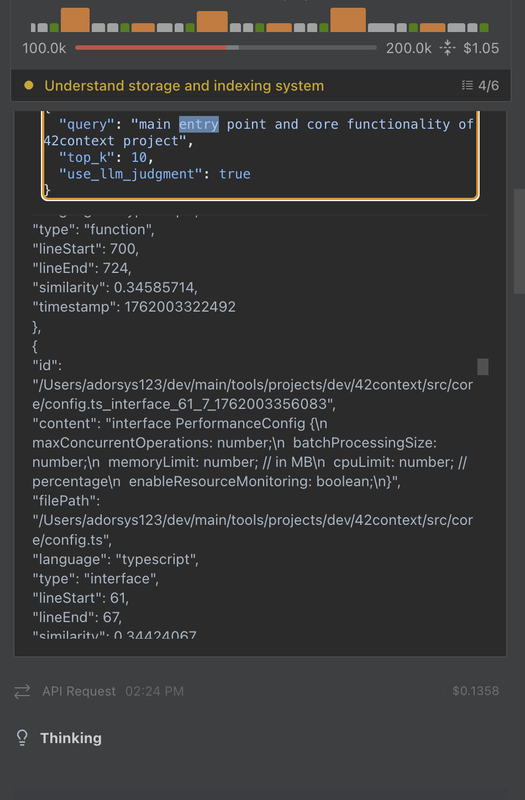
Behind the scenes:
- Kilocode calls the MCP tool:
code_search("query") - 42Context converts the query to a 384-dimensional vector
- ChromaDB searches 34,017 indexed vectors using cosine similarity
- Returns the top 5 matches in 11ms:
"id": "....../src/core/config.ts_interface_44_7_1762003356083",
"content": "interface SemanticSearchConfig {\n  maxResults: number;\n  minSimilarity: number;\n  defaultLanguage?: string;\n  enableCaching: boolean;\n  cacheSize: number;\n}",
"filePath": "....../src/core/config.ts",
"language": "typescript",
"type": "interface",
"lineStart": 44,
"lineEnd": 50,
"similarity": 0.40275550000000004,
"timestamp": 1762003345829
},
{
"id": "....../src/analysis/code-parser.ts_interface_42_7_1762003335060",
"content": "interface CodeParserOptions {\n  languages?: SupportedLanguage[];\n  maxFileSize?: number;\n  timeout?: number;\n}",
"filePath": "....../src/analysis/code-parser.ts",
"language": "typescript",
"type": "interface",
"lineStart": 42,
"lineEnd": 46,
"similarity": 0.40017579999999997,
"timestamp": 1762003322348
},
{
"id": "....../src/core/types.ts_export_73_0_1762003377428",
"content": "export interface SearchOptions {\n  topK?: number;\n  language?: string;\n  filePath?: string;\n  chunkType?: string;\n  minSimilarity?: number;\n}",
"filePath": "....../src/core/types.ts",
"language": "typescript",
"type": "export",
"lineStart": 73,
"lineEnd": 79,
"similarity": 0.398324,
"timestamp": 1762003372741
},
The AI agent gets exactly the context it needs. No manual file pasting. No context window juggling. Just relevant code, retrieved semantically and now it can go ahead exploring the structure of each file that seem to contain relevant data to your query.
The Memory Leak Crisis
This almost didn’t work. The initial implementation crashed at around 500 files with segmentation faults. Memory would climb to 4GB+ then die.
The problem was ONNX.js, which Transformers.js uses under the hood. It allocates native memory for tensors that JavaScript’s garbage collector can’t see. Every embedding operation leaked a bit of native memory.
Worse, I was using Promise.all() to process files concurrently:
// This killed the process
const results = await Promise.all(
  files.map(file => this.processFile(file))
);
With 32 files processing simultaneously, memory would spike before GC could run. Eventually: segfault.
The fix required explicit memory management:
class MemoryManager {
  async checkMemoryPressure() {
    const used = process.memoryUsage().heapUsed;
    const limit = this.config.maxMemoryMB * 1024 * 1024;
    const pressure = used / limit;

    if (pressure > 0.90) {
      // EMERGENCY: reduce batch size and force GC
      this.currentBatchSize = Math.max(1, Math.floor(this.currentBatchSize / 2));
      await this.forceGarbageCollection();
      await this.sleep(5000);
    } else if (pressure > 0.75) {
      // CRITICAL: force GC immediately
      await this.forceGarbageCollection();
      await this.sleep(2000);
    } else if (pressure > 0.60) {
      // ELEVATED: schedule GC
      await this.forceGarbageCollection();
    }
  }

  async forceGarbageCollection() {
    if (global.gc) {
      global.gc();
      await this.sleep(100);
    }
  }
}
Plus explicit tensor cleanup:
async processChunk(chunk: CodeChunk) {
  const embedding = await this.model.encode(chunk.content);

  const result = {
    ...chunk,
    vector: Array.from(embedding.data)
  };

  // CRITICAL: dispose of tensor immediately
  if (embedding.dispose) {
    embedding.dispose();
  }

  return result;
}
And sequential processing with memory checks:
// Process ONE file at a time, checking memory between each
for (const chunk of chunks) {
  await this.memoryManager.checkMemoryPressure();
  const vector = await this.generateEmbedding(chunk);
  results.push(vector);
  await this.cleanup();
}
The results:
- Before: Crashes at ~500 files, unbounded memory growth
- After: Stable processing of 7,620+ files, 640-837MB memory
- Improvement: 15x scale increase, 100% stability
You need to run Node.js with --expose-gc to enable coordinated garbage collection, but it works.
The Performance Numbers
Benchmarked against Keycloak (7,620 Java files, production code):
- Parse Time: 0.3s per file (Tree-sitter AST parsing)
- Embedding Generation: 32 files per batch
- Total Vectors: 34,017 indexed (multiple chunks per file)
- Search Latency: 11ms average for semantic queries
- Memory Usage: 640-837MB stable during indexing
That 11ms search latency is the killer feature. It’s fast enough that semantic search feels instant. Your AI agent can query the codebase as if it has infinite context, but each query only takes 11 milliseconds.
For comparison, trying to parse and understand code in real-time would take seconds per query. Pre-computing embeddings makes the whole system feel immediate.
Why Privacy-First Matters
Everything runs locally:
- Embedding model: Transformers.js (WASM/WebGL)
- Vector database: ChromaDB in Docker locally
- Code parsing: Tree-sitter native bindings
- No API calls, no telemetry, no cloud services
This isn’t just about privacy—it’s about practicality. Most companies can’t send proprietary code to cloud RAG services, no matter how good they are. Local processing removes that adoption barrier entirely.
Plus it’s faster. No network latency, no rate limits, no API costs. Your codebase is already on your SSD; why send it anywhere else?
MCP Makes It Universal
Here’s an example config (works the same for Roocode, Claude Desktop, Cursor, etc.):
{
  "mcpServers": {
    "42context": {
      "command": "42context",
      "args": [
        "server",
        "--transport",
        "stdio"
      ],
      // DSPy-style LLM judgment for better result ranking (a new feature)
      "env": {
        "NODE_ENV": "production",
        "LLM_API_KEY": "",
        "LLM_BASE_URL": "",
        "LLM_PROVIDER": "custom",
        "LLM_MODEL": ""
      },
      "disabled": false,
      "autoApprove": [],
      "alwaysAllow": [
        "code_search",
        "context_analysis",
        "find_related_code",
        "find_implementations"
      ]
    }
  }
}
That’s it. Now any MCP-compatible AI agent can call four tools (was thinking of adding more tools in the future for other advanced functionalities):
code_search: Semantic code retrievalcontext_analysis: Code structure and complexity analysisfind_related_code: Discover related implementationsfind_implementations: Find all implementations of an interface
The same MCP server works with Roocode, Claude Desktop, Cursor, Cline, VS Code extensions, or any MCP-compatible client. Build once, integrate everywhere.
Try It Yourself
Install and run:
# Install globally
npm install -g @aaswe/42context-engine

# Start components (ChromaDB in Docker)
42context start-components --detached

# Index your codebase
42context index /path/to/your/code --recursive

# Start MCP server for AI agents
42context server --transport stdio
Or just semantic search from CLI:
42context search "authentication flow" --language java --top-k 10The project is on GitHub and NPM.
What I Learned
Context windows are the bottleneck: Even with 200k tokens, you can’t fit a real codebase. RAG can solve this somehow…
Semantic retrieval works: Vector embeddings capture meaning. “user authentication” finds validateCredentials()
Memory management is hard: ML models leak memory in surprising ways. You need explicit cleanup, coordinated GC, and pressure monitoring.
Local is faster: No API calls means no latency. 11ms search feels instant.
MCP is the future: Protocol-based integration beats custom IDE plugins. Build one server, work with every AI agent though can come with some security risk in a remote environment
The fundamental insight: don’t try to fit your codebase in context. use tools that lets AI agents retrieve exactly what they need, when they need it. That’s how you give any coding assistant “knowledge” of 7,620 files while properly managing context limits.